Launch your Political Ads with Confidence
Launch your Political Ads with Confidence
Launch your Political Ads with Confidence
Whether you’re a first time digital director or a seasoned ad buyer, the Media Buying Platform (MBP) makes it easy, fast and affordable to place your ads on the best platforms.
This toolkit gives you the resources and know-how to take the next step towards becoming a more proficient MBP user.
Learning Center
Learning Center
Learning Center
Choose your experience level to filter recommended asssets.
Beginner
Beginner
ARTICLE
What is a DSP?
A DSP, or Demand-Side Platform, is a tool that helps advertisers buy digital ads across the internet in one place. Instead of going to individual websites or apps, a DSP lets you reach your audience through channels like Connected TV (CTV), streaming audio, native ads, display, and OTT from a single system.
What is a DSP?
A DSP, or Demand-Side Platform, is a tool that helps advertisers buy digital ads across the internet in one place. Instead of going to individual websites or apps, a DSP lets you reach your audience through channels like Connected TV (CTV), streaming audio, native ads, display, and OTT from a single system.
This process—called programmatic buying—uses data and automation to deliver ads to the right people at the right time, without manual guesswork or one-off placements.
TargetSmart’s Media Buying Platform (MBP) is a DSP built specifically for political campaigns and organizations, with workflows that match the speed, compliance needs, and audience precision required in the political space.
ARTICLE
What is MBP?
The TargetSmart Media Buying Platform (MBP) is a Demand-Side Platform built for progressive and Democratic organizations. It allows you to buy programmatic digital ads—such as Connected TV, streaming audio, native, display, and OTT—from one easy-to-use system.
What is MBP?
The TargetSmart Media Buying Platform (MBP) is a Demand-Side Platform built for progressive and Democratic organizations. It allows you to buy programmatic digital ads—such as Connected TV, streaming audio, native, display, and OTT—from one easy-to-use system.
Our Media Buying Platform is designed specifically for political work. It connects TargetSmart’s high-quality voter data and rapid audience updates directly into your media buying workflow, helping you run campaign, fundraising, persuasion, GOTV, and advocacy programs with speed and accuracy.
The Media Buying Platform is built on TargetSmart data with scores and standard segments preloaded for no extra charge, unlike other platforms. Because of this, our ability to match the individuals reached with ads to the voter file makes our platform uniquely positioned to help inform political campaigns during election season.
ARTICLE
Campaign Success Metrics
Success metrics look different depending on the type of digital ad you’re running.
- For Connected TV, a strong indicator of performance is your Video Completion Rate (VCR)—most campaigns aim for 90–98%, with 95% often considered excellent.
Campaign Success Metrics
Success metrics look different depending on the type of digital ad you’re running:
- For Connected TV, a strong indicator of performance is your Video Completion Rate (VCR)—most campaigns aim for 90–98%, with 95% often considered excellent.
- For Online Video, Video Completion rates should be around 50-65% depending on video length.
- For Display and Native ads, you will look at metrics like Click-Through Rate (CTR) and Viewability. Premium placements typically deliver 85–95% viewability, although 70–85% is a solid benchmark for standard inventory.
Understanding these benchmarks helps you evaluate whether your media is performing as expected and where you may want to adjust your strategy.
ARTICLE
What is an SSP?
An SSP, or Supply-Side Platform, is the publisher-side counterpart to a DSP. While advertisers use a DSP to buy digital ads, publishers use an SSP to make their available ad space accessible across websites, apps, and streaming platforms.
What is an SSP?
An SSP, or Supply-Side Platform, is the publisher-side counterpart to a DSP. While advertisers use a DSP to buy digital ads, publishers use an SSP to make their available ad space accessible across websites, apps, and streaming platforms.
Supply-Side Platforms help publishers manage, price, and sell their inventory in real time. They connect directly with DSPs, allowing your ads to reach high-quality placements across thousands of properties through programmatic buying.
ARTICLE
Does a DSP or MBP place social media ads?
No. A DSP—or the MBP—cannot place ads on major social media platforms like Meta. These platforms operate as “walled gardens,” meaning their user data and ad inventory are closed off from outside buying systems.
Does a DSP or MBP place social media ads?
No. A DSP—or the MBP—cannot place ads on major social media platforms like Meta. These platforms operate as “walled gardens,” meaning their user data and ad inventory are closed off from outside buying systems.
To advertise on Facebook, Instagram, or other social platforms, you must place ads directly through their own ad management systems. The Media Buying Platform is designed to complement, not replace, your social media advertising. We can make sure that these are coordinated by pushing the digital audiences to other social platforms so your audience can be reached in multiple places.
ARTICLE
Budget Builder
Setting your digital media budget starts with understanding what you are trying to achieve. Begin by defining your goal, identifying your audience size, and deciding how often you need to reach them (frequency) and through which tactics—such as CTV, display, or streaming audio.
Budget Builder
Setting your digital media budget starts with understanding what you are trying to achieve. Begin by defining your goal, identifying your audience size, and deciding how often you need to reach them (frequency) and through which tactics—such as CTV, display, or streaming audio.
From there, you can estimate impression volume, CPM expectations, and overall budget ranges to meet your objectives. These pieces work together to help you estimate the investment needed to run an effective and efficient program.
Early User
Early User
ARTICLE
Getting Started with MBP
Before you launch your first campaign in TargetSmart’s Media Buying Platform, there are a few key pieces you’ll need in place:
- A clear goal: fundraising, persuasion, list-building, turnout, etc.
Getting Started with MBP
Before you launch your first campaign in TargetSmart’s Media Buying Platform, there are a few key pieces you’ll need in place:
- A clear goal: fundraising, persuasion, list-building, turnout, etc.
- Defined audiences: who you are trying to reach and how they’re segmented.
- Creative assets: video, display, or audio ads that meet spec requirements.
- Budget and timing: how much you plan to spend and over what period.
Once those basics are set, the platform helps you structure flights, assign tactics (CTV, display, audio, native), and apply the right audiences so your program launches cleanly.
ARTICLE
Digital Advertising Use Cases
Digital advertising can support many different goals in a campaign. Common use cases include:
- Awareness: introducing a candidate, organization, or issue.
Digital Advertising Use Cases
Digital advertising can support many different goals in a campaign. Common use cases include:
- Awareness: introducing a candidate, organization, or issue.
- Persuasion: shifting opinions among targeted segments.
- Mobilization/GOTV: reminding identified supporters to vote.
- Fundraising: driving small-dollar donations or event RSVPs.
- List-building: growing SMS and email universes.
For each use case, the Media Buying Platform allows you to match the right ad types (CTV, video, display, native, audio) with the right goals and metrics (VCR, CTR, conversions, reach, frequency) so you can measure whether you are on track.
ARTICLE
Monitoring and Optimizing a Live Campaign
Once your campaign is live, it is important to monitor key performance signals to ensure your ads are delivering efficiently and reaching the right audiences.
Monitoring and Optimizing a Live Campaign
Once your campaign is live, it is important to monitor key performance signals to ensure your ads are delivering efficiently and reaching the right audiences.
Key Indicators to Watch
- Delivery: Are impressions pacing in line with your goals?
- Frequency: Are you reaching your audience often enough — but not too often?
- Performance metrics: For example, VCR for CTV; CTR and viewability for display/native.
- Inventory mix: Are your ads serving in the expected environments and placements?
If something looks off — under-delivery, low VCR, low viewability, or inefficient CPMs — adjustments to budget allocation, targeting, or creative can help improve performance.
Optimization FAQ
Trouble Spending Because of Small Audience / Segment Limitations
- If geo-targeting is baked into the audience segment, target the campaign statewide. Example: GA_SD2_primary voters should be targeted statewide rather than restricting to “Georgia + State Senate District 2.”
- Audience sizes of 1,000 or fewer require higher starting CPMs to stay competitive in bidding.
- Expand audiences where possible.
- Change or add creative. Introducing a new creative can reinvigorate an audience and drive CPMs down.
Trouble Spending Because of Creative Problems
- If performance is low due to creative issues, confirm that the ad meets the technical requirements for each placement.
- Refer to the MBP User Guide for creative specs.
Trouble Spending Because of Low CPM / Frequency Settings
- If your CPM is maxed out and you are winning most bids, increasing frequency can help deliver and lower CPMs (though reach may decrease).
- Lower frequencies generally improve reach but can increase CPMs.
- Higher CPMs can improve reach if:
- You are at the beginning of your campaign and the DSP is still learning which inventory performs best.
- Your audience is small (under 1,000). The DSP’s machine learning requires more data to make informed bidding decisions; low bids can prevent that.
- You are targeting high-quality inventory such as mid-stream OLV, CTV-only placements, or political inventory with zero gaming placements included.
Trouble Spending Inside a Geofence
- Target all devices. If you are not targeting all devices within a geofence, spend and reach will be severely limited. Geofencing relies heavily on GPS/device location data, so targeting at least mobile devices is recommended.
- Expand or remove segment targeting if the audience remains too small to scale.
Supply Package Optimization
- Verify that all SSPs are allowed.
- Ensure that at least two supply packages are being used.
ARTICLE
Building an Audience with TargetSmart Data
Strong digital programs start with the right audience. In MBP, audiences can be built and activated from:
- ListBuilder, for custom audience creation based on TargetSmart voter data.
Building an Audience with TargetSmart Data
Strong digital programs start with the right audience. In MBP, audiences can be built and activated from:
- ListBuilder, for custom audience creation based on TargetSmart voter data.
- SmartMatch, for matching customer or supporter files into digital IDs.
- VAN/VoteBuilder API connections, where applicable.
- Segments built directly in-platform, based on geography, demographics, or modeled attributes.
By combining these tools, you can create precise audiences for persuasion, turnout, or fundraising and keep them refreshed as your underlying data updates.
Advanced
Advanced
ARTICLE
About WIRE and Pixel Tracking
WIRE and pixel tracking allow you to connect ad delivery to on-site behavior and downstream outcomes. By placing a pixel on key pages—such as donation forms, sign-up pages, or key issue content—you can:
About WIRE and Pixel Tracking
WIRE and pixel tracking allow you to connect ad delivery to on-site behavior and downstream outcomes. By placing a pixel on key pages—such as donation forms, sign-up pages, or key issue content—you can:
- Measure conversions: see how many people take an action after seeing or clicking an ad.
- Build remarketing pools: re-engage people who visited but didn’t complete an action.
- Inform attribution: understand which tactics and audiences are driving high-value actions.
- Generate insights: see how different segments engage with your content and paths.
In MBP, pixel-based insights can help you refine your targeting, adjust budgets toward higher-performing tactics, and build more efficient fundraising or acquisition programs over time.
ARTICLE
Advanced Best Practices for Campaigns and Ad Types
As you move from basic launches into more sophisticated programs, a few best practices help keep your campaigns efficient:
Advanced Best Practices for Campaigns and Ad Types
As you move from basic launches into more sophisticated programs, a few best practices help keep your campaigns efficient:
- Match tactic to goal
- CTV and video for broad persuasion and awareness.
- Display and native for efficient reach and retargeting.
- Audio for reinforcement and “always-on” presence.
- Set realistic CPM expectations: CTV typically has higher CPMs than display/native due to premium inventory.
- CTV: $35 – $50
- OLV: $17 – $35
- Display: $7.50 – $12.50
- Audio – $20 – $30
- Native – $10 – $15
- Calibrate Reach and Frequency
- Ensure you’re reaching enough of your universe.
- Avoid oversaturating a small audience with too many impressions.
- CTV: 5-7 times/ week
- OLV: 10-12 times/week
- Audio: 7-9 times/week
- Display: 15-20 times/week
- Native: 10-15 times/week
- Plan for testing: Try creative variants, audience splits, or tactic mixes to see what performs best, then scale into the winners.
Where Do My Ads Go?
Learn how ad delivery works in MBP and what to expect once a campaign is live.
How To Access Reporting
Learn where to find reporting in MBP and how to access high-level performance data.
How To Check Pacing Reports
Learn how to check pacing reports and quickly understand whether your ads are on track.
Improving Ad Performance
Learn the primary ways to adjust audience, size, bid, and frequency to optimize performance over time.
North Carolina Supreme Court
See how a North Carolina program used MBP to reach key voters with targeted digital ads and drive measurable results.

Case Study: Winning a Key Judicial Race in North Carolina with TargetSmart’s Media Buying Platform
Background
In a high-stakes North Carolina Supreme Court race, the North Carolina Democratic Party (NCDP) partnered with TargetSmart to secure a crucial victory. With the help of our Media Buying Platform’s (MBP) cutting-edge digital tools, Democratic incumbent Allison Riggs retained her seat with 50.01% of the vote, ensuring an eight-year term.
The Challenge
The NCDP needed to boost Justice Riggs’ name recognition and mobilize low-propensity voters across North Carolina. With just three weeks before Election Day, a highly targeted, data-driven approach was essential.
The Strategy
TargetSmart developed a full-service digital campaign, leveraging MBP’s advanced targeting capabilities across major online platforms, including Meta, YouTube, and Connected TV (CTV). The campaign focused on four key voter segments with tailored messaging:
- Black women (25+) – “Experience over Extremism”
- Men, Native Americans, and Latinas (25+) – “Families & Future”
- Young Black women (18-25) – “Control Your Own Body”
- All other women – “Control Your Own Body”
In addition to personalized messaging, MBP continuously refined targeting by removing early voters from ad audiences, maximizing efficiency and relevance.
The Results
The campaign delivered over 1.8 million highly targeted display ad impressions, reaching key voters with impactful messaging. Our approach on social and CTV likewise drove exceptional engagement:
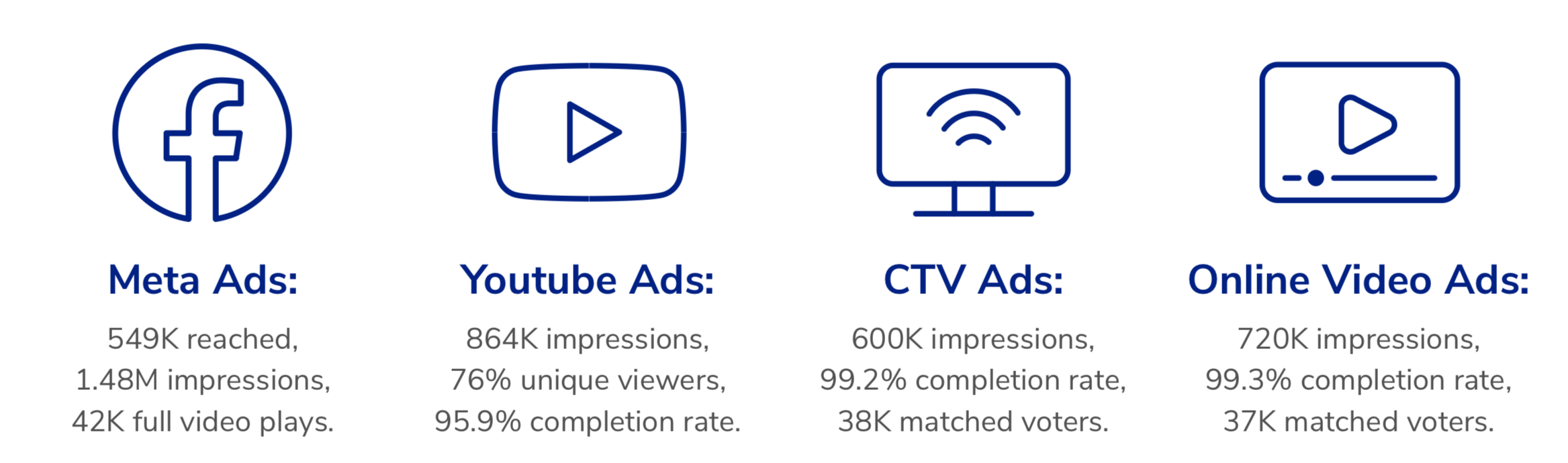
The Impact
By leveraging the MBP’s superior data capabilities, the campaign successfully turned out 73% of targeted voters, helping to secure a critical judicial seat. With industry- leading video completion rates and precise voter engagement, TargetSmart played a pivotal role in this election victory. By combining customized messaging, real-time voter data optimization, and expansive digital reach, we delivered measurable results in a race decided by razor-thin margins.
Ohio Abortion Rights
Learn how a campaign in Ohio leveraged MBP and TargetSmart data to reach the right voters and improve outcomes.

Case Study: Ohio Abortion Rights
Background
In the 2023 General Election, Ohioans voted on a constitutional amendment (Issue 1) “to make and carry out one’s own reproductive decisions,” including decisions on contraception, fertility treatment, miscarriage, and abortion. TargetSmart worked with the Ohio Democratic state party to implement a digital campaign to persuade voters to support the amendment.
The Strategy
Running from October 3 to November 7, the campaign delivered five rounds of targeted display, Connected TV (CTV), and Over-The-Top (OTT) ads, reaching over 984,000 households across Ohio. The strategy focused on persuading diverse voter segments, particularly female and African American audiences, and employed real-time data streams to automatically exclude early voters.
The Impact
Issue 1 passed with 56.8% voting YES. With a modest $45,000 budget, the campaign achieved a cost-per-vote of just $4.56—nearly 89% lower than industry norms—while reaching 52% of its targeted households, exceeding the industry average by 12%. Through close collaboration with the client’s digital agency and direct access to ad logs, the campaign proved highly efficient, cost effective, and impactful in advancing reproductive rights at the ballot box.
User Guides
User Guides
MBP
Step-by-step guide for working in the Media Buying Platform, from setting up your first campaign to monitoring performance and optimizing over time.
ListBuilder
Learn how to use ListBuilder to create, refine, and export audiences for use in MBP and other channels.
SmartMatch
See how SmartMatch connects your supporter or customer files to digital IDs so you can reach them through MBP campaigns.
Terminology
From Ad Logs to WIRE, we’ve compiled a list of helpful terms to help you understand and get the most out of the Media Buying Platform.
Media Buying Platform - Terminology
- Ad log: The ad logs are the detailed exhaust from each campaign run on the TargetSmart Media Buying Platform. Each row of an ad log corresponds to an impression. Ad logs show detailed information for each impression including the audience, creative, GEO and publisher
- Ad Specs: The technical requirements for an ad to be displayed on a placement, including file formats, size, dimensions and more. Ex, typical specs for a CTV campaign on a streaming platform is 15s or 30s, 16×9 dimensions, 10-40 mbps, and .mp4 format.
- Allow List: An exclusive list of Publishers to whom an advertiser wants to distribute their ads
- Audio Advertising: Advertising space within digital audio content like podcasts, streaming music and online radio.
- Block List: A collection of publishers to whom client does NOT want to distribute their ads
- CPM (Cost per Thousand): The industry standard for summarizing the cost of digital advertising. For example, 1,000 display ads costs a customer $5 when they use our platform to run their display campaigns.
- CTV (Connected Television): Referring to Smart TVs or other TV sets that are connected to the internet via streaming devices – or, in other words, the device on which you are accessing video content (assuming that device is not your phone, iPad or laptop).
- Data Onboarding: Process of uploading offline customer data to the online environment to match with digital identifiers. Data onboarding is used to connect offline customer records with online users by matching Personally Identifiable Information (PII) gathered from offline datasets to find the same customers online.
- Deal ID: Also known as PMP. A Deal ID (Deal Identifier) is a unique string of characters used in programmatic advertising to match a specific buyer with a specific publisher based on pre-negotiated terms.
- Display Advertising, also known as Banner ads: A digital advertising format where graphic ads are shown on a web page. The term originated in newspapers, and the principles still apply. Display ads can be graphics, videos, interactive images (a quiz or a game), and expandable.
- DSP (Demand Side Platform): A platform that allows advertisers to bid for and purchase inventory from publishers (supply side) through one single interface. The Media Buying Platform is a DSP built by TargetSmart.
- Flight : The entire length of time a campaign or creative runs.
- Frequency : How many times an ad has been shown to a household on any given day, week, or flight.
- Impressions: The number of times an ad has been served, regardless of whether the user has seen or interacted with the ad in any way
- Match back List : A list of names from a custom targeted list matched to the ad log data that can be provided to show the individuals within a household that were exposed or unexposed to an ad.
- Match back Reports : Aggregated metric report of custom targeting data matched to the ad logs to view the number of individuals or households that were reached or not, by the campaign. We may match additional data sets to showcase the rate and cost of an action (sign up, donation or even vote history) for your target list.
- Native Ads: Ads that blend seamlessly into website content. These can include in-feed ads and sponsored articles.
- Online Video (OLV) : Video ads that play before or during content on sites. Also referred to as pre-roll ads.
- OTT (Over the Top): Meaning over the top of the “box” and refers to video content that is accessed via the internet instead of traditional cable via set-top-box (STB) or satellite TV. OTT should not be used to discuss the device on which you are watching, which means you could be watching OTT content on a connected TV, but also on your laptop or tablet. Netflix, Hulu, Disney+, Peacock and Apple TV+ are all examples of OTT providers.
- Programmatic Media Buying: An automated method of buying media that ensures that advertisers are reaching the right person, at the right time, in the right place. The ads are bought based on a set of parameters pre-defined by the company placing the ads. Programmatic advertising uses data to make decisions about which ads to buy in real-time, which improves efficiency and increases the effectiveness of the ads.
- Reach: Total number of unique households exposed to your campaign
- Supply-side platforms (SSPs) : SSPs help publishers sell their ad space to buyers through DSPs. This is an invaluable platform that consolidates publishers looking to drive revenue from their websites or video assets.
- Supply Package: A group of Deal IDs from various SSPs bundled together for a campaign to target and bid on.
- WIRE: Website Identity Resolution Engine. TargetSmart’s pixel that allows MBP campaign managers to see who took what actions on the website and view demographics and attributes of website visitors.